What to Do When PJP Visit Behavior Looks Unexpected on Mobile
When your company uses Permanent Journey Plan (PJP), the way the channel list, calendar, and Check-In behave changes compared to normal visitation. A lot of those changes are intentional — but they can look like bugs the first time you see them.
This article walks through the most common “wait, why is the app doing that?” situations and explains what’s actually happening and what (if anything) you should do.
Quick navigation
- Channel visibility looks wrong
- I can’t start or repeat a visit
- My check-in fails unexpectedly
- My achievement or visit count changed
- Something happened during or after my visit
- Other things that can change overnight
Channel visibility looks wrong
“I can’t see channels I expect on my homepage.”
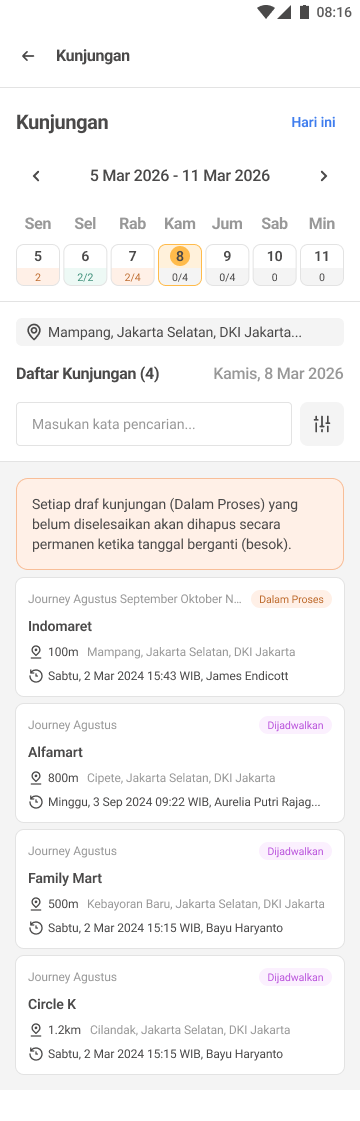
What’s happening: PJP is active and your homepage is restricted to ONLY today’s scheduled channels. Channels that are assigned to you in the channel module but not in today’s PJP schedule are hidden by design.
What to do:
- Open the calendar at the top of the Channel List Page and check today’s date. If it shows
Q/N(e.g.0/5), you have 5 scheduled visits today. - If today shows no target (no
Nvalue), no PJP applies for today and the system will fall back to your full assigned channel list. Pull down to refresh, or open the full Channel List Page directly. - If the schedule looks wrong, confirm with your admin — they may need to add or adjust the journey plan for today.
“I see a channel I’m sure isn’t assigned to me.”
What’s happening: Your admin has scheduled this channel in your PJP for today. PJP can include channels outside your normal channel-module assignment, but only on the appointed date.
What to do:
- Visit it normally. It will disappear from your list outside the appointed date.
- This is not a permanent assignment — completing the visit does not add the channel to your regular list.
“I see the same channel twice in today’s list.”
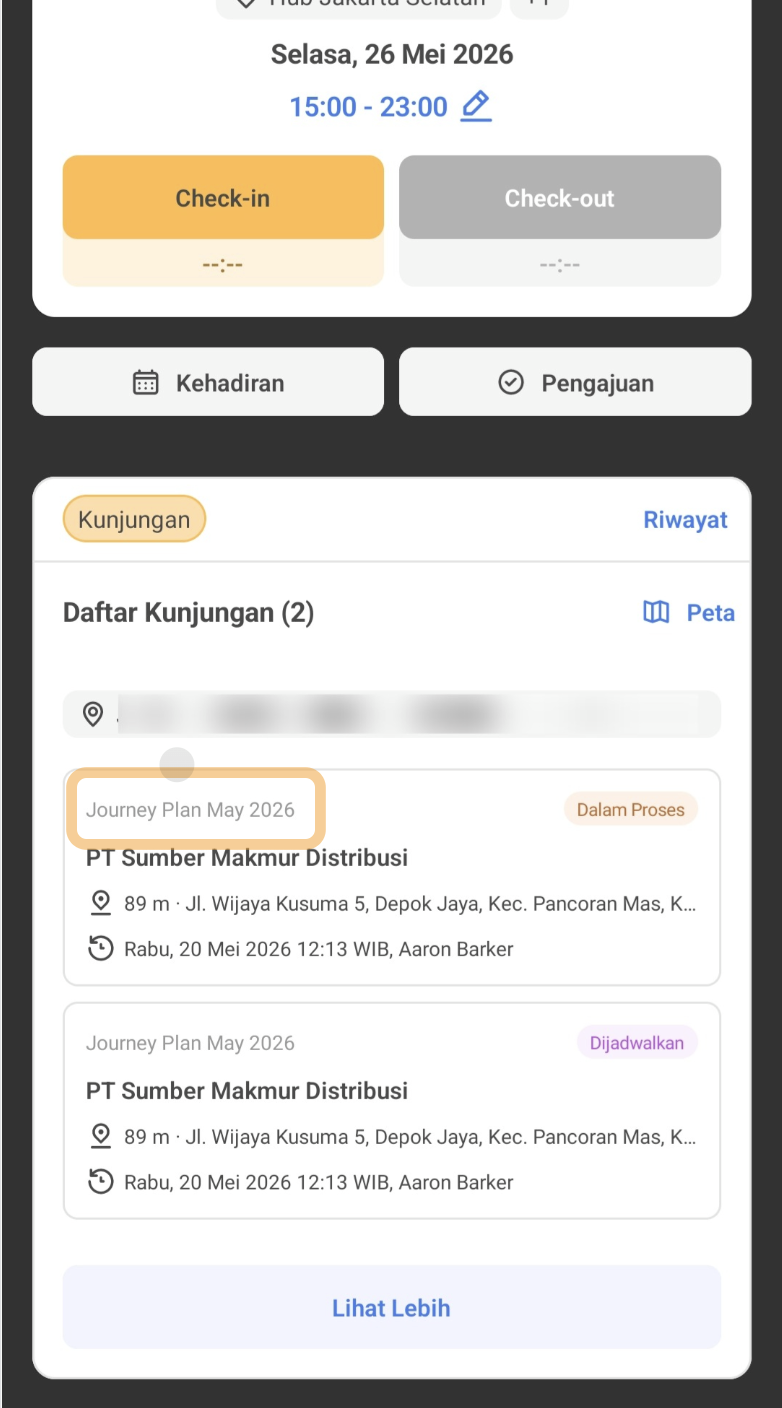
What’s happening: Your admin scheduled the same channel multiple times for today. PJP intentionally allows duplicate Employee + Channel + Date rows — this is how they schedule multiple visits to the same outlet on the same day.
What to do:
- Each card has its own unique Visit ID and must be completed independently.
- Completing one does NOT auto-complete the other. You need to check in and check out twice — one for each row.
I can’t start or repeat a visit
“I just completed a visit but the channel is now blocked. Check-In is disabled.”
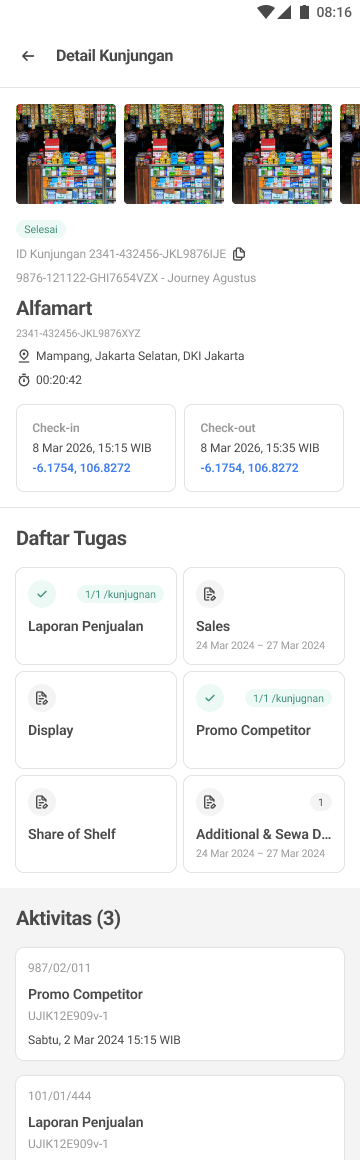
What’s happening: This is the PJP one-time-per-row rule. Once a scheduled visit reaches Selesai, that same planned row cannot be revisited. The card stays visible (so you can review the history), but the Check-In action is permanently disabled for that row.
What to do:
- If you need another visit to this channel today, ask your admin to add a new row to your PJP via “Add More Journey Plan.”
- Alternatively, wait until the next scheduled date for this channel — it will become available again on that day.
Note: this restriction only applies to PJP visits. Non-PJP visits still allow unlimited revisits as before.
“I tapped tomorrow’s date and the Check-In button is disabled.”
What’s happening: PJP visits cannot be executed before their appointed date. Even repeated taps, refreshes, or deep links cannot bypass the disabled state.
What to do:
- Wait for the appointed date.
- Tomorrow’s preview is for planning only — you can review channel info and contact actions (WhatsApp, Telpon, Map), but no visit can be started.
“I can’t perform any PJP visit — every channel says I need a visitation policy.”
What’s happening: Channels need an active visitation policy assigned to your account to allow check-in, regardless of whether PJP is active. PJP governs WHAT to visit and WHEN; Visitation Policy governs HOW the visit is verified (selfie / geofence).
What to do:
- Contact your admin to assign you a visitation policy.
- See the validation rules article for the exact blocking modal and what it says.
My check-in fails unexpectedly
“My check-in failed with ‘Kunjungan tidak tersedia’ and I was sent back to the channel list.”
What’s happening: The channel was deleted or deactivated by your admin before or during your check-in — this can happen even mid-process (during selfie or geofence verification).
[Placeholder image: “Kunjungan tidak tersedia” error message]
What to do:
- No partial visit was saved, so nothing is lost.
- Pull down to refresh the channel list to see the latest available channels.
- Confirm with your admin whether the channel was intentionally removed or temporarily deactivated.
My achievement or visit count changed
“My achievement % dropped overnight without me missing anything.”
What’s happening: Your admin uploaded additional journey plans via “Add More Journey Plan”, which increased your total target (N) while your completed count (Q) stayed the same. This is expected behavior, not a bug.
Example: Yesterday you had 5/5 = 100% achievement. Overnight, your admin added 3 more visits to your plan. This morning you see 5/8 = 62.5%.
What to do:
- Complete the newly added visits to bring achievement back up.
- Your existing completions are never lost or recalculated incorrectly.
- Check the calendar — the dates with newly added visits will show updated target counts (
N).
“Two of my PJP groups overlap on the same date — the counts look weird.”
What’s happening: Overlapping PJP groups COMBINE their visits on the same date for the same employee. Your daily target N is the SUM of all combined visits, and achievement is calculated against this combined total.
Example: Group 1 assigns you 40 visits for today + Group 2 assigns you 5 visits for today = total 45 visits shown for today. Achievement uses 45 as the denominator.
What to do:
- This is the intended behavior. The same channel appearing in both groups will show as separate cards that each must be completed individually.
- Treat all the cards as your full plan for the day — the source PJP Group is shown on each card so you know where each visit came from.
Something happened during or after my visit
“I started a visit yesterday but never checked out — what happens?”
What’s happening: When the device date changed at midnight, your visit was auto-marked as Tidak Selesai (incomplete). It cannot be resumed or completed.
What to do:
- The visit appears on yesterday’s date with the Tidak Selesai status. You can open the card to review the check-in details, but check-out is permanently unavailable.
- The visit counts toward
N(target) but notQ(completed), so it reduces your achievement for yesterday. - This visit is NOT recorded in your Riwayat — only successfully checked-out visits make it into history.
“I started a non-PJP visit before PJP became active. What now?”
What’s happening: Your administrator activated a PJP while you were in the middle of a non-PJP visit. The system preserves your in-progress visit to avoid disrupting your work.
What to do:
- Complete your current visit normally — the original non-PJP behavior is preserved.
- That visit will NOT count toward PJP achievement, because it wasn’t initiated from a PJP-scheduled channel.
- Your NEXT visit must be initiated from a PJP-scheduled channel for it to count toward your PJP achievement.
Other things that can change overnight
“A PJP Group I’m in is now Inactive. What changes?”
What’s happening: The group’s end date has passed, or your admin manually used “Force Stop” to end it early.
What to do:
- PJP rules drop for that group.
- If you have no other active PJP for today, you’ll see your standard assigned channel list with the regular non-PJP behavior (all assigned channels visible, no scheduled/completed badges, no daily target).
- Past completed visits from that group are preserved in your Riwayat — you don’t lose any history.
Still stuck?
If your situation doesn’t match any of the cases above, or you’ve followed the suggested action and the behavior hasn’t changed:
- Pull down to refresh the relevant page (Homepage, Channel List, or Calendar).
- Force-close and reopen the app to make sure you have the latest data from the server.
- Contact your internal admin or help center — they have visibility into your PJP assignments, channel assignments, and visitation policy that you don’t have on your end.